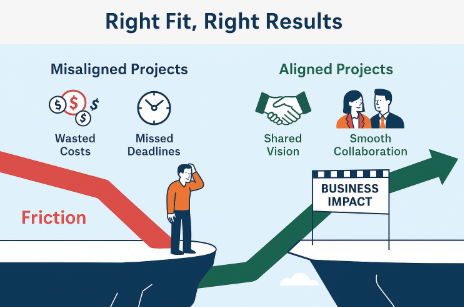
When you’re running a consulting business, there’s always pressure to say yes. Yes to the deal. Yes to the timeline. Yes to the client—even when your gut says no.
But here’s what I’ve learned. Bad clients cost you…
1. Your best people Great consultants don’t stick around to be micromanaged, blamed, or jerked around by unrealistic demands. If you put them in a toxic engagement, they’ll quietly leave—for another team or another company.
2. Your culture Culture isn’t built by posters or happy hours. It’s built by how you handle stress, setbacks, and relationships. A single client who bullies, ghosts, or disrespects your team can undo months of internal goodwill.
3. Your momentum Bad clients drain energy. They consume twice the hours, spark daily fires, and burn out your leadership team. While you’re managing drama, better opportunities pass you by.
4. Your margin There’s always scope creep. Always surprises. And always delays—usually caused by the client, not your team. And yet, you end up eating the cost.
5. Your brand If your team is stuck in damage control, they’re not delivering their best work. And that’s what the client remembers. Suddenly, you look like the problem.
So how do you avoid this? At Intertech, we’ve learned to listen to the red flags early:
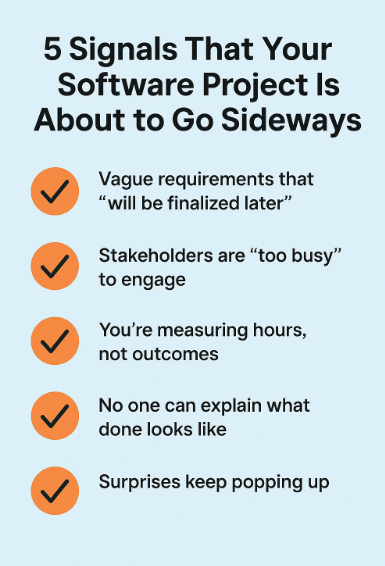
Vague scope but urgent deadlines
Disrespectful behavior in the sales process
Unclear ownership or no internal champion
Unrealistic expectations combined with no flexibility
When we see these, we pause. We ask better questions. And sometimes, we politely pass.
Bottom line? Not all revenue is good revenue. And, the wrong client doesn’t just cost you profit—it costs you people, progress, and peace of mind. Say no early. Your team will thank you later.
Over the years, I’ve had the chance to work with hundreds of CIOs—from Fortune 500s to fast-growing mid-market companies. Different industries. Different styles. But if there’s one thing I’ve learned, it’s this:
CIOs don’t want more tech. They want better outcomes.
They’re not looking to chase trends—they’re trying to solve real business problems. Quickly. Clearly. Without drama.
Here are a few lessons I’ve learned working alongside them:
1. Simplicity beats cleverness CIOs don’t need consultants to show off. They need partners who simplify, prioritize, and deliver. If you can explain the solution in plain English and connect it to a business objective, you’ll go far.
2. Speed matters—but predictability matters more Yes, CIOs want fast results. But they’ll take a steady, low-risk rollout over a “hero” team that burns out mid-project. On-time and drama-free often wins the renewal.
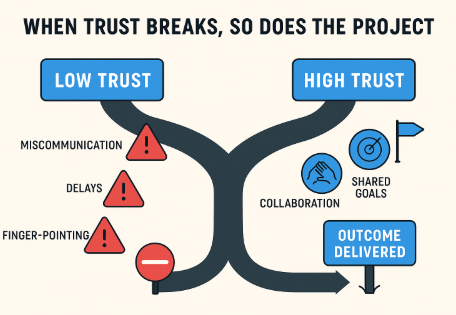
3. Trust builds over time—and disappears fast One missed deadline or dropped ball, and you’re back to square one. But if you consistently deliver (even small wins), you become part of their inner circle. That’s where real partnership lives.
4. Every CIO has a top 3 list It might not be printed on their whiteboard, but they’re always carrying three priorities—revenue, risk, or roadmap related. If your solution doesn’t map to one of those three? It’s noise.
5. They’re under more pressure than you think CIOs today are expected to be technologists, strategists, diplomats, and firefighters—all at once. The best thing we can do is make their life easier, not harder.
Bottom line? CIOs don’t care how brilliant your code is or how advanced your architecture looks. They care about outcomes. Alignment. And trust.
You win with CIOs by listening well, thinking clearly, and delivering consistently.
That’s been true for over 30 years. It’s still true now.
In today’s competitive work environment, leveraging Artificial Intelligence (AI) can significantly enhance individual performance. Here are practical ways professionals can integrate AI into their daily tasks to work smarter, faster, and more efficiently.
1. AI-Powered Task Management
Using AI-driven task management tools like Todoist can help prioritize daily tasks based on deadlines, project timelines, and personal productivity patterns. These tools learn from your behavior to suggest optimal times for tackling complex tasks versus routine work, helping you manage your energy and focus better throughout the day.
2. Enhanced Data Analysis with AI
For those who work with data, tools like Tableau or Microsoft Power BI incorporate AI to assist in analyzing large datasets to uncover trends and insights without the need for complex queries. These insights can help in making data-driven decisions swiftly, providing a competitive edge in strategic planning and operations.
3. AI for Writing and Content Creation
AI writing assistants like Grammarly or Jasper can enhance writing quality by suggesting improvements in grammar, tone, and style, making communication more effective. For more advanced content creation, these tools can help generate ideas, draft content, and even optimize it for SEO, which is particularly useful for marketing professionals and content creators.
4. Automated Scheduling and Email Management
AI tools such as x.ai and Boomerang can automate meeting scheduling, follow-ups, and email management. These tools analyze your schedule and preferences to arrange meetings without the back-and-forth, suggest optimal times for email sending, and remind you when it’s time to follow up, ensuring you never miss a beat.
5. Personalized Learning and Development
Platforms like Coursera and LinkedIn Learning use AI to suggest courses and learning paths tailored to your career goals and skill gaps. This personalized approach ensures that you’re always developing relevant skills that enhance your capabilities and impact at work.
6. Voice-Activated Assistants for Improved Productivity
Voice-activated AI assistants like Google Assistant and Amazon Alexa can be used to set reminders, manage tasks, take notes, and retrieve information quickly and hands-free, allowing you to stay focused and organized without having to stop what you’re doing.
7. Real-Time Collaboration Tools
AI-enhanced collaboration tools like Slack and Microsoft Teams integrate with other AI tools to provide real-time assistance during meetings, offer summarized notes, and suggest action items, improving team collaboration and meeting productivity.
By integrating these AI tools into your work routine, you can automate mundane tasks, gain valuable insights, and spend more time on strategic activities that enhance your performance and career progression.
As we step into 2025, the landscape of software development continues to evolve at a breakneck pace. Staying ahead of the curve not only requires awareness but also strategic foresight. Here are the key technology trends that are shaping the future of our industry and how businesses can leverage them for growth:
1. Artificial Intelligence (AI) and Machine Learning (ML) Expansion
AI and ML are no longer just buzzwords but are core components of business strategy. This year, we see these technologies becoming more integrated into everyday applications, enhancing everything from analytics to user interfaces. Companies can harness AI for predictive analytics, customer service, and personalized user experiences.
2. Quantum Computing Goes Mainstream
With major advances in quantum technology, 2025 might be the year it transitions from experimental to practical applications. Quantum computing offers unprecedented processing power, which can solve complex problems much faster than traditional computers. Businesses in fields such as pharmaceuticals, aerospace, and finance stand to benefit immensely.
3. Increased Adoption of Edge Computing
As IoT devices proliferate, edge computing is becoming crucial in handling data efficiently. By processing data near its source, edge computing reduces latency and conserves bandwidth. This trend is vital for businesses that rely on real-time data processing, like those in manufacturing and logistics.
4. Blockchain Beyond Cryptocurrency
Blockchain technology is finding new applications beyond its initial use in cryptocurrency. From supply chain enhancements to secure voting systems, blockchain offers transparency and security in transactions. Businesses should consider how blockchain can be integrated into their operations to enhance trust and efficiency.
5. Sustainable Tech Innovations
As environmental concerns mount, sustainable technology is more crucial than ever. Innovations in energy-efficient computing and environmentally friendly data centers are gaining traction. Companies focusing on sustainability will not only reduce costs but also attract eco-conscious consumers.
6. Cybersecurity Advancements
With the rise of digital transformations, cybersecurity remains a top priority. New technologies are emerging to tackle the increasing sophistication of cyber threats. Businesses need to stay updated with the latest security technologies to protect sensitive data and maintain customer trust.
7. The Rise of Augmented Reality (AR) and Virtual Reality (VR)
AR and VR are transforming various industries, from retail to real estate. These technologies offer immersive experiences that enhance customer engagement and operational training. Businesses should explore how AR and VR can be integrated into their customer offerings and internal processes.
Navigating these trends requires not only technological adoption but also a cultural shift within organizations. Businesses that embrace these changes and invest in upskilling their teams will thrive in the evolving digital landscape.
In a world where time is our most valuable commodity, finding the right tools to maximize productivity can be a game-changer. While we’re all familiar with popular tools like Slack, Trello, or Asana, there are several hidden gems that can significantly boost your efficiency. Here’s a list of top productivity tools you might not be using, but absolutely should consider adding to your arsenal.
1. Notion
Why You Should Use It: Notion is a powerhouse tool that combines notes, tasks, databases, and project management into one platform. It’s perfect for leaders and teams who want to organize everything in one place, from meeting notes to long-term strategic plans.
Key Features:
Customizable pages and databases
Collaborative workspace
Integrations with tools like Slack and Google Drive
Why You Should Use It: Serene is designed for deep focus. It helps you achieve flow by blocking out distractions, setting goals, and breaking your day into productivity sessions with timed breaks. Perfect for leaders juggling multiple projects.
Why You Should Use It: Time tracking is often overlooked but critical for understanding where your time goes. Toggl Track helps you measure productivity and track billable hours, perfect for consultants or teams working on client projects.
Why You Should Use It: Email is a major productivity killer. SaneBox helps you clean up your inbox by filtering out unimportant emails, helping you focus only on what truly matters. Think of it as a smart filter for your email chaos.
Why You Should Use It: Motion uses AI to automatically plan your day based on your tasks and meetings, making sure you’re always working on what’s most important. It’s ideal for leaders who want to optimize their schedules without the hassle of manual planning.
Why You Should Use It: Forest is a fun and effective way to stay focused. Every time you stay focused on a task, you plant a virtual tree. If you get distracted and leave the app, the tree dies. It’s great for individuals who need an extra nudge to maintain focus.
Key Features:
Visual encouragement through virtual trees
Statistics on focused time
Integration with real-life tree planting initiatives
Why You Should Use It: ClickUp is an all-in-one productivity platform that lets you manage tasks, docs, goals, and more. It’s a strong alternative to tools like Asana or Trello, with a more customizable and flexible interface for growing teams.
Why You Should Use It: Need help concentrating? Brain.fm provides music specifically designed to improve focus. Backed by neuroscience, this tool helps you get into a productive mindset faster than regular background music.
Why You Should Use It: TextExpander saves you time by turning repetitive typing into quick, custom shortcuts. It’s perfect for leaders who frequently send similar emails or reports, and it works across platforms and apps.
Why You Should Use It: For leaders constantly in meetings, Otter.ai transcribes conversations in real-time, helping you capture important points without missing a beat. It’s especially useful for recording meetings and sharing notes with the team.
These tools, while lesser-known, can significantly improve your productivity by automating tasks, enhancing focus, and organizing your day more effectively. Whether you need to manage your time better, cut through the clutter of your inbox, or simply concentrate more deeply, there’s a tool here for you. Give them a try, and let me know which ones make the biggest impact on your workday!